Case Intake & Validation
Capture and validate cases through manual entry or seamless integrations with business apps.
Transforming Litigation & Arbitration Through AI and Automation.
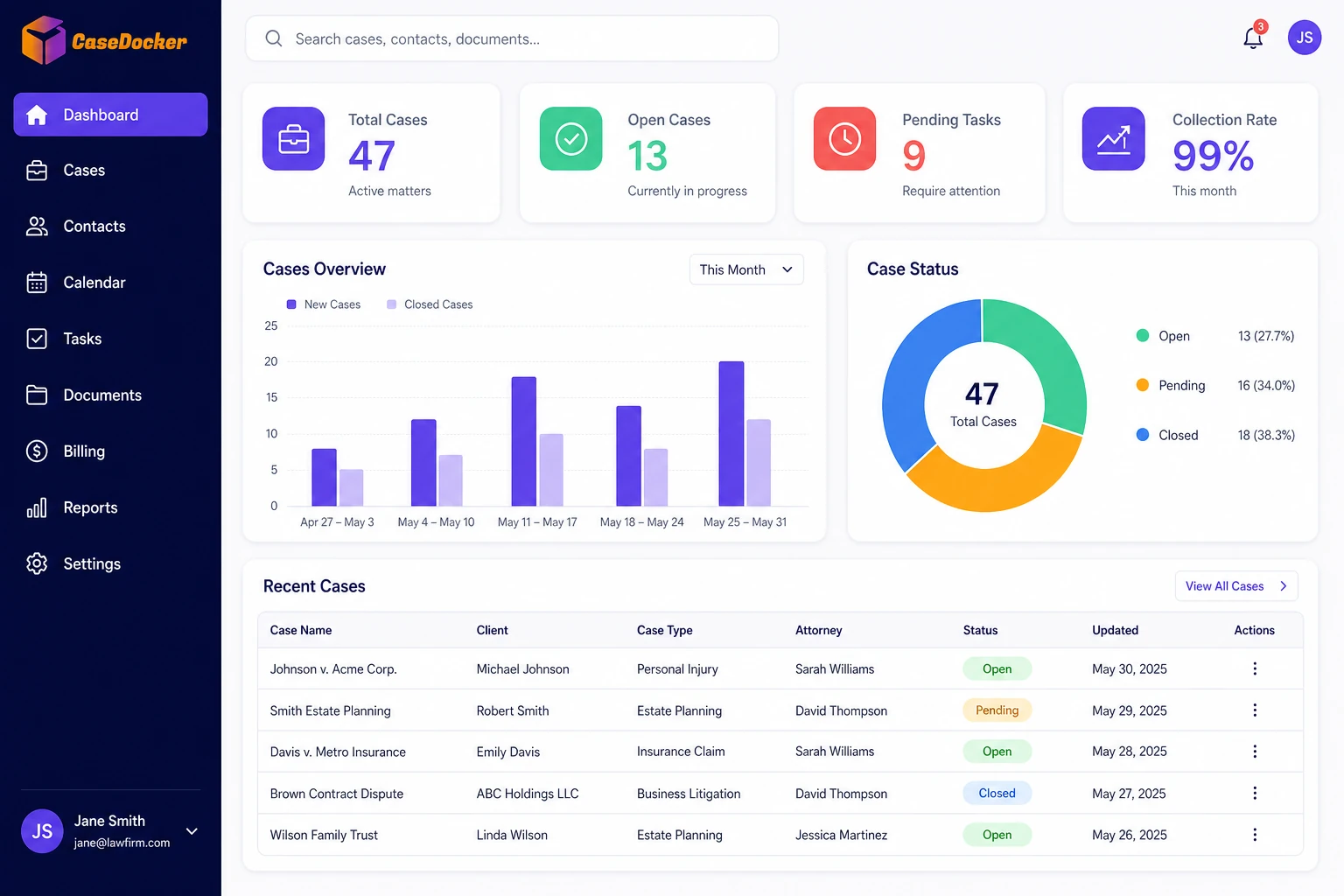
CaseDocker’s LCM module is designed to manage the full lifecycle of litigation and arbitration cases. Infused with AI for automation, research, and predictive analytics. Centralizes case tracking, document management, court proceedings, and legal team collaboration.
In focus
CaseDocker’s LCM module is designed to manage the full lifecycle of litigation and arbitration cases.
See how the case workspace captures case details, owners, documents, and early tracking inputs in a structured legal file.
LCM empowers legal departments with AI-enhanced efficiency, improving case handling speed, accuracy, and strategic value through intelligent automation and knowledge reuse.
Follow how court and hearing information can be reviewed from the cause-list workflow so teams can stay aligned on next actions.
Capture and validate cases through manual entry or seamless integrations with business apps.
Maintain a unified digital repository of all case documents, notes, and communications.
Track legal issues, enforce compliance rules, and manage legal holds with precision.
Automated alerts and calendar syncs ensure timely action on hearings and deadlines.
Utilize standard legal templates and automate case workflows for faster execution.
Generate dynamic reports and monitor case trends through smart dashboards.
Explore how Legal Case Management works seamlessly with Playbook Automation, Notice Handling, and Contract Lifecycle Management.
Automates legal workflows across systems using rule-based logic and no-code tools.
Playbooks integrate with the Case Management module to automate intake, escalation, and task assignments based on lifecycle events.
A case status update triggers task reassignment and escalates to legal leadership based on predefined thresholds.
| Feature | CaseDocker LCM | Traditional Solutions |
|---|---|---|
| AI-Assisted Legal Drafting | Leverages CDGenie for intelligent drafting, issue identification, and content suggestions. | Relies entirely on manual input without AI support, increasing drafting time and risk. |
| Digital Case File | Maintains a unified, structured repository of all case documents, notes, and communications. | Stores case information in fragmented or document-based formats with limited structure. |
| Legal Research Integration | Includes CaseDocker Research Bed for contextual legal references, precedents, and analysis. | Offers little to no built-in legal research capabilities, requiring external tools. |
| Case Finder (Court Scanning) | Automatically scans court systems in real time to detect and update relevant cases. | Lacks automated court data integration; case updates must be manually tracked. |
| Smart Dashboards | Customizable, geo-tagged dashboards for case tracking and stakeholder visibility. | Limited to static views with minimal customization or location awareness. |
| Playbook Automation | Built-in Playbook engine enables rule-based automation of legal workflows. | Manual or limited automation features requiring separate tools or scripting. |
| Document Versioning & Collaboration | Collaborative editor with real-time co-authoring and version control. | Requires manual uploads; lacks version history or collaboration features. |
| Integration with Enterprise Apps | Integrates with ERP, CRM, and HRMS via APIs and Playbook triggers. | Uses manual imports (e.g., CSV) or no integration with enterprise systems. |
| Court Tracker | Supports multi-jurisdiction tracking with automatic updates and alerts. | Limited jurisdiction support; users must track cases manually. |
| Alerts & Escalation | AI-enhanced alerts and escalation rules based on case priorities and timelines. | Limited to basic rule-based alerts with no contextual escalation logic. |
| Legal Analytics | Powered by the R3 Framework to provide actionable legal insights and trend analysis. | Offers basic reporting capabilities without predictive or comparative insights. |
| Cost Tracker / ROI Insights | Includes built-in tools to track case costs and measure legal ROI. | No built-in cost tracking or ROI assessment functionality. |
Via intake forms, email ingestion, and API; Playbooks auto-route to owners based on type, priority, and SLAs.
Read focused guides on what to evaluate, how teams use the software, and how CaseDocker fits common legal operations workflows.
Browse all focused solution guides for legal case management, legal AI, contract management, compliance, online eSigning, and digital signature workflows.
View guideLearn what legal case management software should include for matters, hearings, documents, reminders, dashboards, and connected legal workflows.
View guideA practical guide to law firm management software for matter files, court dates, documents, client updates, tasks, and reporting.
View guideSee how CaseDocker can reduce costs and accelerate legal workflows.